
SO WHAT HAS HAPPENED?
In the attacks mentioned above Microsoft’s cybersecurity team reported – The attackers then used the stolen credentials and session cookies to access affected users’ mailboxes and perform follow-on business email compromise (BEC) campaigns against other targets.
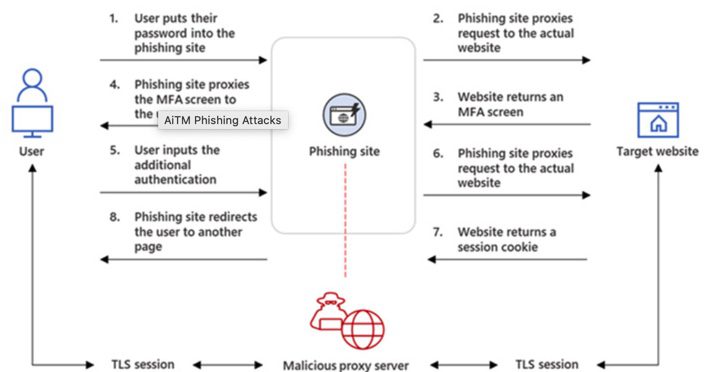
The intrusions entailed setting up adversary-in-the-middle (AitM) phishing sites, wherein the attacker deploys a proxy server between a potential victim and the targeted website so that recipients of a phishing email are redirected to lookalike landing pages designed to capture credentials and MFA information.
“The phishing page has two different Transport Layer Security (TLS) sessions — one with the target and another with the actual website the target wants to access,” the company explained.
“These sessions mean that the phishing page practically functions as an AitM agent, intercepting the whole authentication process and extracting valuable data from the HTTP requests such as passwords and, more importantly, session cookies.”
Once in possession of this information, the attackers injected the cookies into their own browsers to circumvent the authentication process, regardless of whether the victim had enabled MFA protections.
“The session cookie is proof for the web server that the user has been authenticated and has an ongoing session on the website,” Microsoft explained. “In AitM phishing, an attacker attempts to obtain a target user’s session cookie so they can skip the whole authentication process and act on the latter’s behalf.”
The phishing campaign spotted by Microsoft was orchestrated to single out Office 365 users by spoofing the Office online authentication page, with the actors using the Evilginx2 phishing kit for carrying out the AitM attacks.
This involved sending email messages containing voice message-themed lures that were marked with high importance, tricking the recipients into opening malware-laced HTML attachments that redirected to the credential-stealing landing pages.
To complete the ruse, the users were eventually routed to the legitimate office[.]com website post-authentication, but not before the attackers leveraged the aforementioned AitM approach to siphon the session cookies and obtain control over the compromised account.
The attacks didn’t end there, for the threat actors abused their mailbox access to perform payment fraud by using a technique called email thread hijacking to dupe parties on the other end of the conversation to illicitly wire funds to accounts under their control.
To further mask their communications with the fraud target, the threat actors also created mailbox rules that automatically moved every incoming email containing the relevant domain name to the “Archive” folder and marked it as “read.”
“It took as little time as five minutes after credential and session theft for an attacker to launch their follow-on payment fraud,” Microsoft noted.
The attackers are said to have employed Outlook Web Access (OWA) on a Chrome browser to conduct the fraudulent activities, while also deleting from the account’s Inbox folder the original phishing email as well as the follow-on communications with the target from both the Archive and Sent Items folders to erase traces.
“This AiTM phishing campaign is another example of how threats continue to evolve in response to the security measures and policies organizations put in place to defend themselves against potential attacks,” the researchers said.
SO WHAT CAN YOU DO?
Microsoft have a whole section on their website on how to spot these kind of phishing emails and what to do with them if you think you have one – you can access this by clicking here.
You can also follow the below steps that we recommend to prevent a phishing attack happening to you and your team –
– Train your team how to identify and report phishing (we can help with this
– Test the team regular with simulated phishing attacks that allow them to practice
– Educate users on how to identify fake login pages
– Make sure you and your team are rotating passwords regularly
– Don’t ignore updates
– Call us to make sure you have the most up to date cybersecurity software installed on your machines
DON’T BE CAUGHT OUT, THERES ONLY SO MUCH WE CAN HELP YOU WITH AFTER THIS HAS HAPPENED!!

© 2025 All rights reserved
No obligation. Just straightforward advice.
We provide support when something stops working, so your team is not left dealing with IT issues alone.
Each issue is handled by someone who understands your setup, allowing us to respond quickly and resolve problems without unnecessary back and forth. Whether it is a small fix or something more urgent, we focus on getting things working again as soon as possible.
We also help with day-to-day questions, giving your team clear guidance and practical support when they need it.
Whether support is needed remotely or on-site, we make sure problems are resolved with minimal disruption to your business.
Need support right now?
We look after your Apple devices over time so everything continues to run as it should.
Devices are kept up to date, settings remain consistent, and any changes are handled in a controlled way. This helps prevent small issues from turning into bigger problems and keeps everything running smoothly.
We make sure your devices stay organised and easy to manage as your business grows, without adding pressure to your internal team.
Whether you have a handful of devices or a larger setup, we help you stay in control without needing to manage everything yourself.
Want to simplify management?
We prepare your Apple devices so they are ready to use from the moment they arrive.
Each device is set up with the correct user access, applications, and settings, so your team can start working without delays or confusion. There is no need for manual setup or trial and error.
We also make sure your devices are connected properly to your existing systems, so everything works together as expected from day one.
Whether you are setting up a few devices or rolling out across your business, we keep the process simple, consistent, and reliable.
Need help getting set up?

